 Graylog: Using with Python
How to send logs from Python to Graylog
👋 Welcome to the Stackhero documentation!
Stackhero offers a ready-to-use Graylog cloud solution that provides a host of benefits, including:
- Unlimited and dedicated SMTP email server included.
- Effortless updates with just a click.
- Customisable domain name secured with HTTPS (for example, https://logs.your-company.com).
- Optimal performance and robust security powered by a private and dedicated VM.
Save time and simplify your life: it only takes 5 minutes to try Stackhero's Graylog cloud hosting solution!
Sending logs from Python to Graylog is straightforward. In this example, we will use the packages graypy and logging to achieve this.
Configure Graylog
On the Graylog side, you need to create a GELF TCP input.
Go to your Graylog admin panel, then in "System"/"Inputs" and create a new "GELF TCP" input. Check the "global" box, add a "title", and ensure that the port is set to 12201.
Do not activate any TLS option here. The TLS encryption will be handled by the reverse proxy included with your instance.
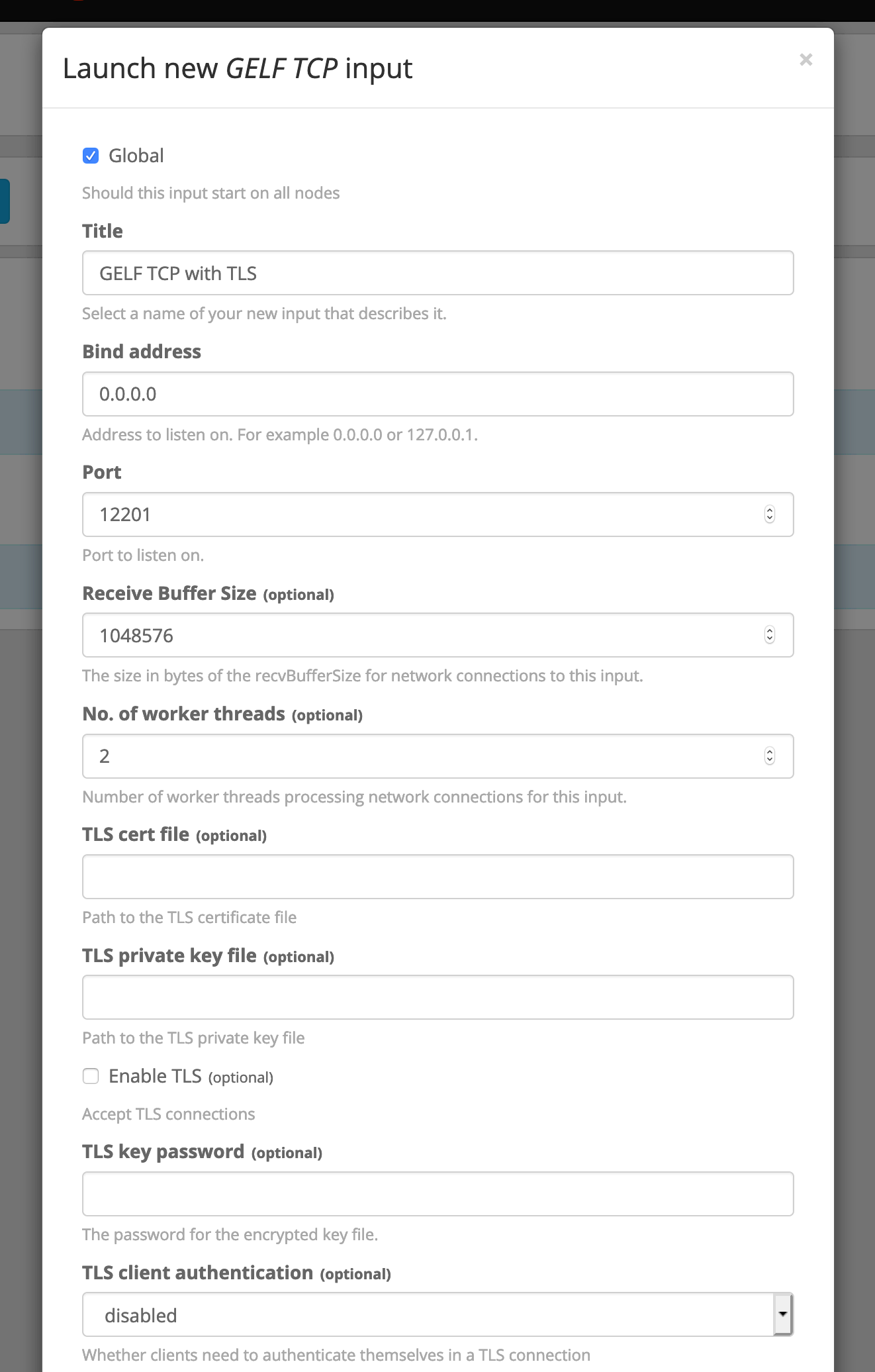 Input configuration
Configure the service
On the Stackhero dashboard, go to your Graylog service and click on "Configure".
Ensure that the TCP port 12201 is correctly defined and enable "TLS encryption" for it, then validate your configuration.
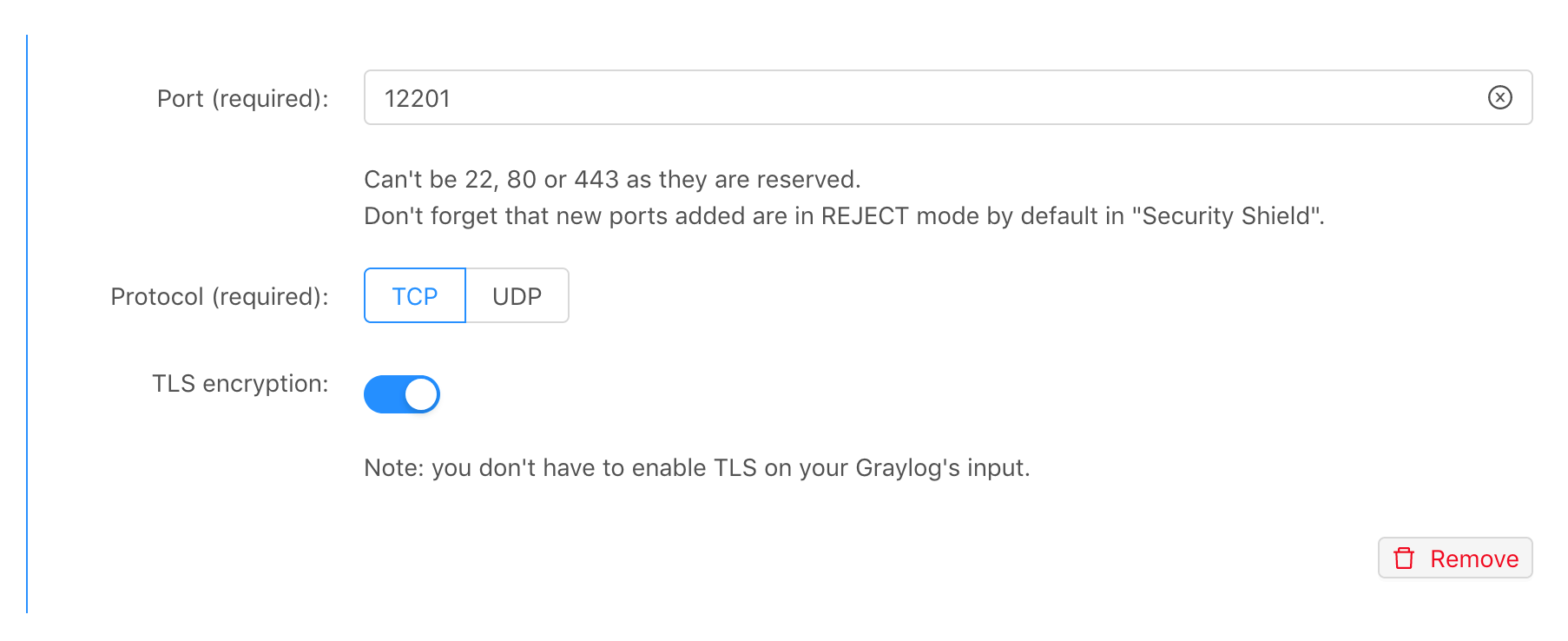 Input port configuration
You should check in your service's "Firewall" that you have allowed at least your IP to send data to the TCP port 12201. For testing purposes, it might be easier to allow all IPs (0.0.0.0/0), which is the default setting.
Example of Python code
For this example, we will use the graypy library. You can simply install it with pip install graypy.
Then, you can write the following code in a file called graylog-example.py and replace XXXXX.stackhero-network.com with the hostname of your server:
import logging
import graypy

my_logger = logging.getLogger('test_logger')
my_logger.setLevel(logging.DEBUG)

handler = graypy.GELFTLSHandler('XXXXX.stackhero-network.com', 12201)
my_logger.addHandler(handler)

my_logger.debug('This is a test from a Python script!')
Go to your Graylog admin panel, click on the "Search" tab, click on the play icon, and select "Update every 1 second." Then, you can run the script using this command line: python graylog-example.py.
The script will send the log to Graylog, and you should see it on your Graylog search page!
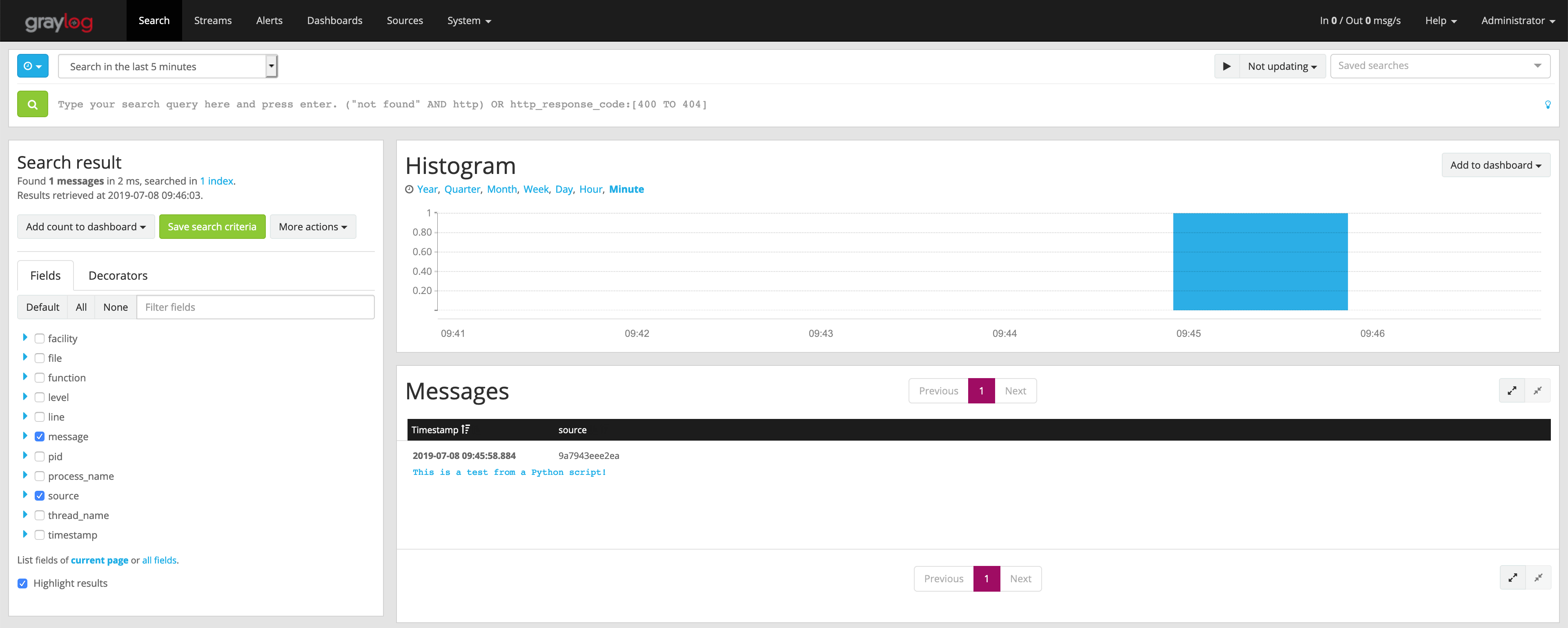 Your first log received on Graylog
Click on the sentence "This is a test from a Python script!" and you will see some useful information like the script name, the line that creates the log, etc.
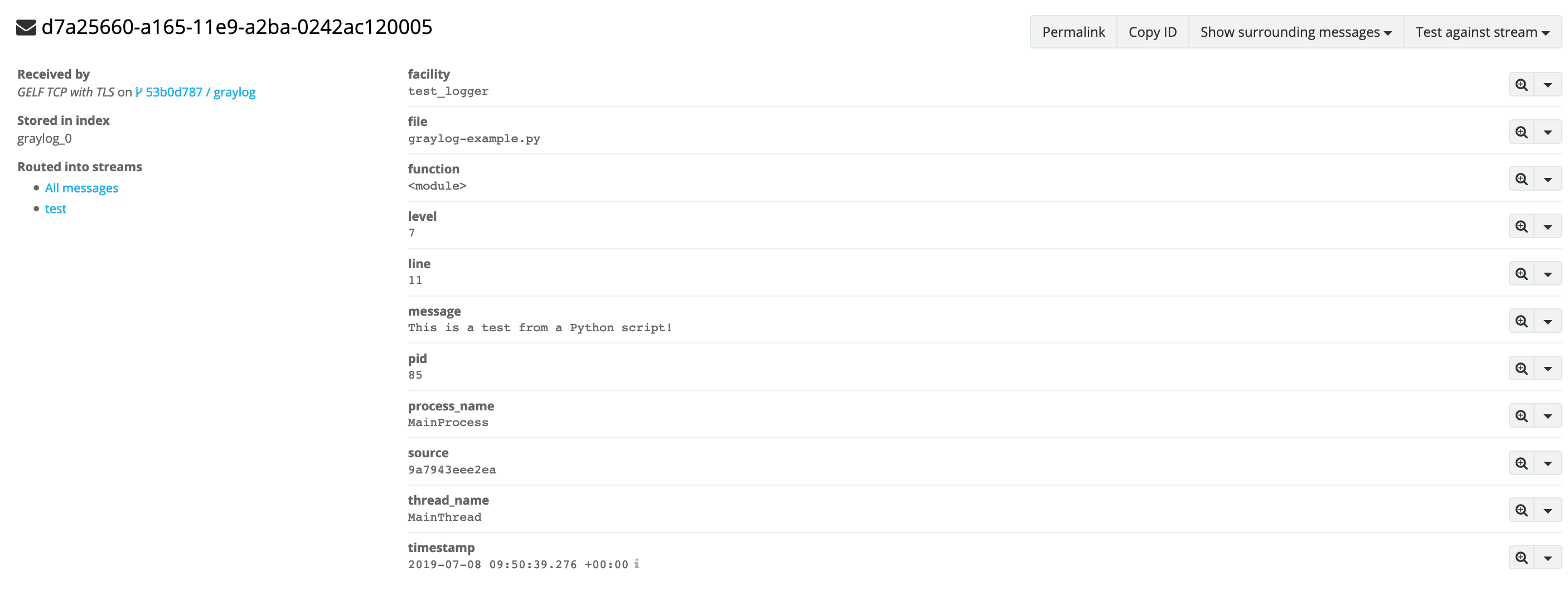 Detailed log
Send errors to Graylog
One useful feature is to catch errors and send them to Graylog, so you will have a global overview of errors triggered by your application. You will even get the ability to send notifications on such errors via email, or using Slack or Mattermost.
In this example, we try to call the function unknown_function, which does not exist. Do not forget to replace the value "XXXXX.stackhero-network.com" with your instance hostname.
import logging
import graypy

my_logger = logging.getLogger('test_logger')
my_logger.setLevel(logging.DEBUG)

handler = graypy.GELFTLSHandler('XXXXX.stackhero-network.com', 12201)
my_logger.addHandler(handler)

try:
  unknown_function()
except NameError:
  my_logger.debug('The "unknown_function" raised an error', exc_info=1)
Run the script and go back to your Graylog admin panel. You will see the error "NameError: name 'unknown_function' is not defined" and the full stack trace!
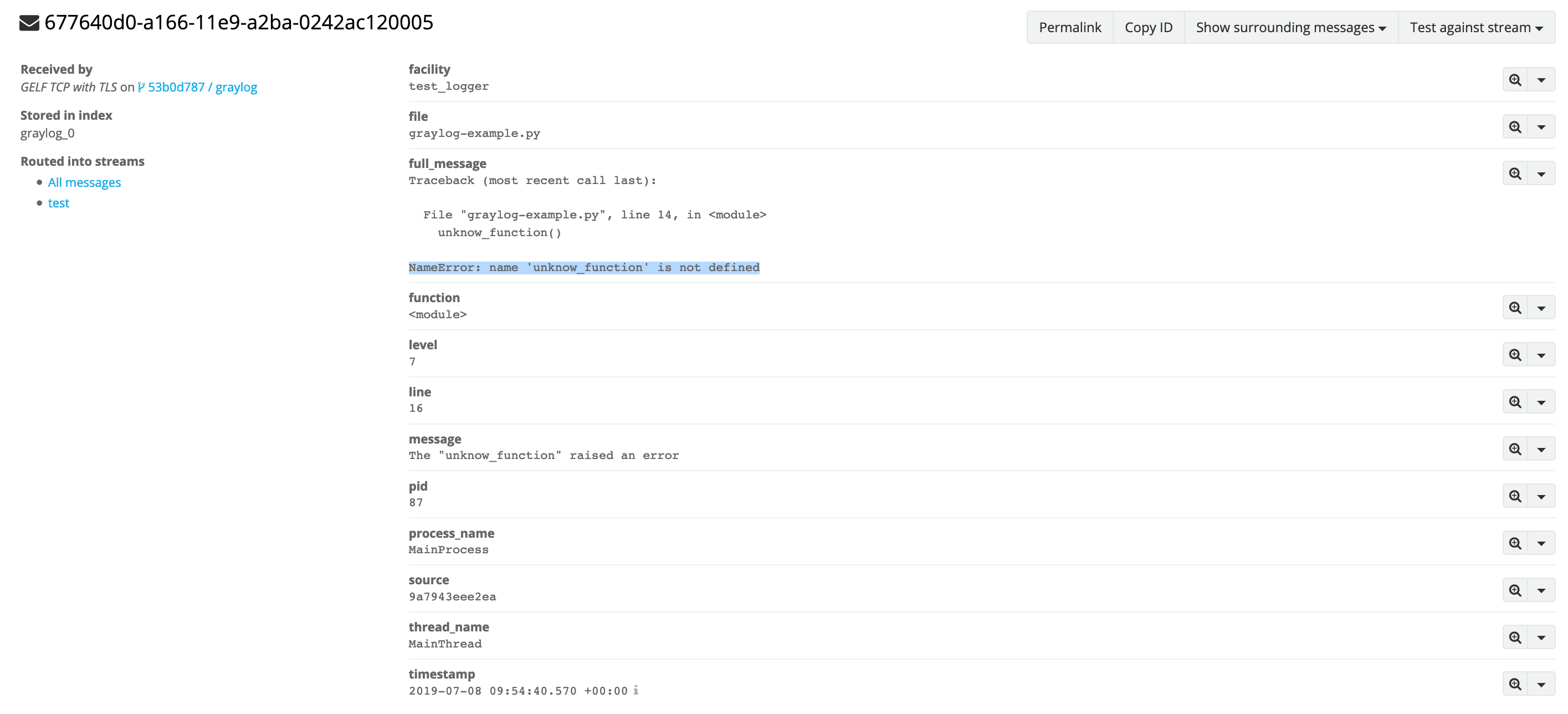 Error log example
Hardening communication security
In the previous examples, we used TLS to encrypt the communication but we did not check the certificate validity. This was for demonstration purposes, but for production, you should check the certificate validity.
You can do it by simply adding the options validate and ca_certs like this:
handler = graypy.GELFTLSHandler('XXXXX.stackhero-network.com', 12201, validate=True, ca_certs='/etc/ssl/certs/ca-certificates.crt')
You should ensure that the file /etc/ssl/certs/ca-certificates.crt exists:
- On Ubuntu/Debian, you can install it with
sudo apt install ca-certificates. - On Alpine Linux, install it with
apk add ca-certificates. - On macOS it is installed by default but named
/etc/ssl/cert.pem.
Troubleshooting
If you do not receive logs in your Graylog, you might want to check these points:
- Graylog should have a defined input of type "GELF TCP", listening on port 12201, without any TLS configuration defined.
- Graylog configuration in the Stackhero dashboard (button "Configure") should have the port 12201 defined, with TCP and TLS activated in "Input ports".
- Firewall on the Stackhero dashboard should show you the port "12201/tcp" as "ACCEPT", ideally at position #1 with source 0.0.0.0/0 defined (for testing purposes).
- You should watch for logs on your Graylog's admin panel in "Search". To ensure you see your logs, select "Search in the last 1 hour", click on the play icon, and select "Update every 1 second".